
To view a website made with ReactJS from your domain, follow these steps:
- Add the
homepageto your package.json file
Open your React application. Then, open the package.json file and add a “homepage” attribute as follows:
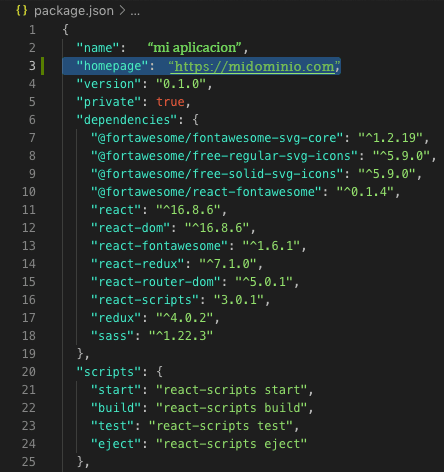
The format should be "homepage": "https://mydomain.com"
- Create the build for your application
- In the root directory of your application, run the command
yarn installto install updated dependencies. - Once that has finished, run the command
yarn build(npm installandnpm buildalso work). - You will notice that this creates a new directory in your project called build. The build directory is, basically, a bundled version of your app that contains everything your browser needs to identify and run your application.
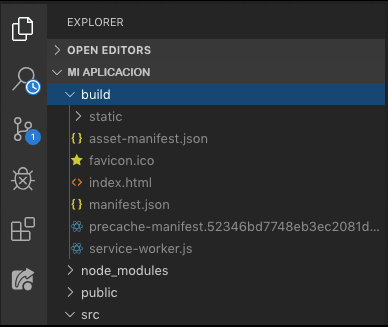
- Upload the contents of the build directory to the website root directory in your hosting account.
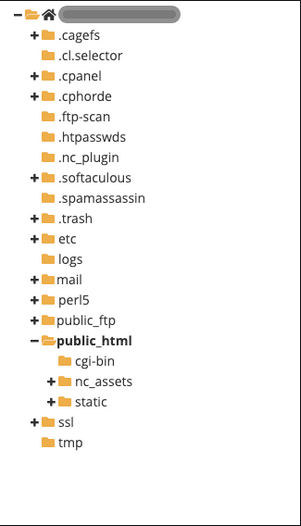
The next step is to upload the contents of the build directory you created in the previous step to the root directory of your website. Using the File Manager in the control panel, or by accessing via FTP.\ \ In the case of a cPanel account, the directory would be public_html.
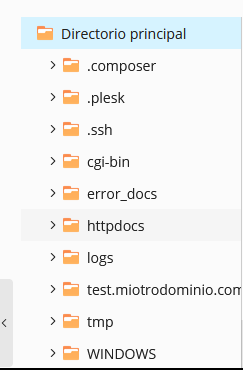
In the case of a Plesk account, the directory would be httpdocs.
This is an example of the directory structure of a cPanel account, where you will see the public_html directory.
And this is an example of the directory structure of a Plesk account, where you will see the httpdocs directory.
This is an example of the typical files you will see in your build directory, which you should upload to public_html, httpdocs or the root directory of your website.
.png)
- Create the .htaccess file
For routes to work in your React application, you will need to add a .htaccess file.\ You should create this file in the public_html, httpdocs or the root directory of your website, at the same level as the contents of the build directory you uploaded earlier.\ \ Edit the file and insert the following basic information:
<IfModule mod_rewrite.c>

  RewriteEngine On
  RewriteBase /
  RewriteRule ^index\.html$ - [L]
  RewriteCond %{REQUEST_FILENAME} !-f
  RewriteCond %{REQUEST_FILENAME} !-d
  RewriteCond %{REQUEST_FILENAME} !-l
  RewriteRule . /index.html [L]

</IfModule>
Then save the changes to the file.
That’s it!
Now you can use your domain in the browser and you should see your web application fully functional.