
How to view my website without a domain?
Hashtags: #hosts #etc #delegate #point #dns
- To be able to view your website without having a domain pointing to it, you must edit the hosts file located at:
C:/Windows/System32/drivers/etc - In that file add this line at the end:
IPdetuservidor tudominio.com.ar www.tudominio.com.ar
Example:
66.55.125.22 midominioejemplo.com www.midominioejemplo.com
- The IP number is the one of the server where your hosting account is located.
- The domain you choose can be any for temporary use.
- Note that you must edit this file with Notepad by opening it with administrator privileges, as shown below:
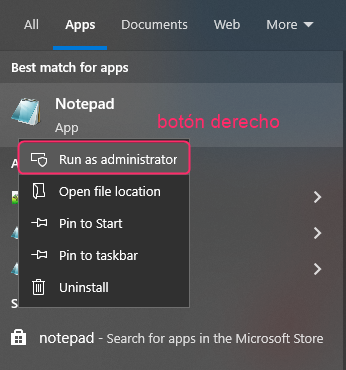
- Then restart your PC.
- That’s all. Now you can test your website using your test domain. When you have your real domain pointing to your hosting account you can delete the lines added to the hosts file.