

Where to view my website’s error logs in cPanel?
To view the error logs that your website may be generating, follow these steps:
- Log in to your account’s control panel and then go to the Files=>File Manager box.
- In the File Manager go to the logs directory.
- Look for the error logs file. It will have the format: tudominio_com.php.error.log
Right-click that file and, in the menu, select the View option.
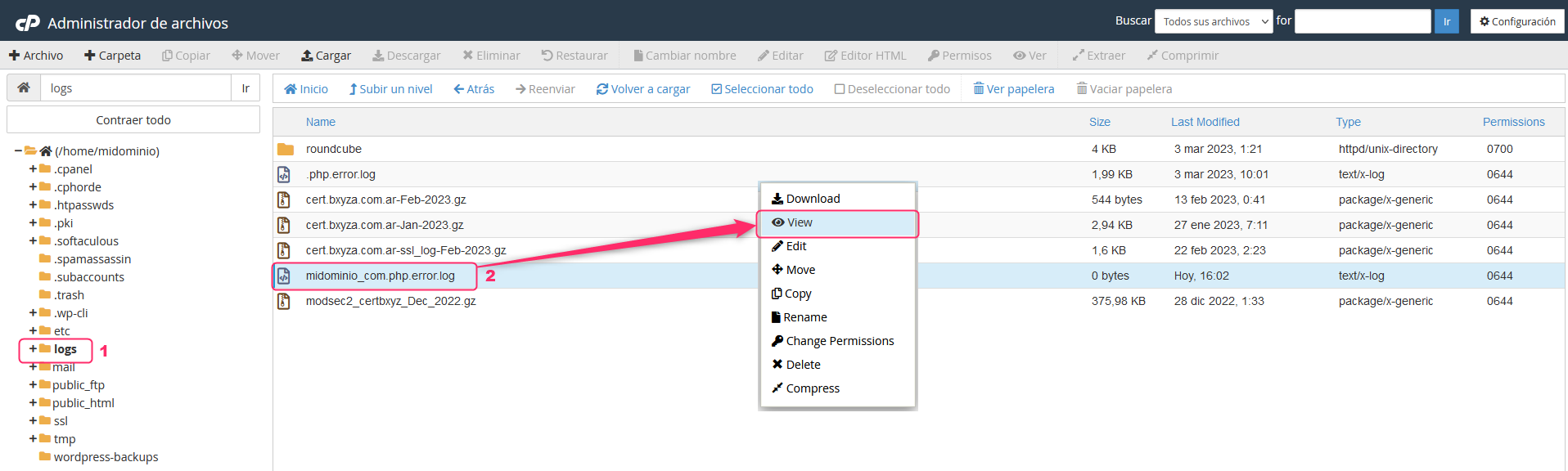
- You will see the contents of the error log.

- Keep in mind that, sometimes, this file can take up many GB due to accumulated information. In these cases it will not allow you to view the file.
Contact technical support so they can check the error in these cases.