How to access mailboxes via Webmail with HestiaCP
Below we will show you how to check your mailboxes from the Webmail of HestiaCP.
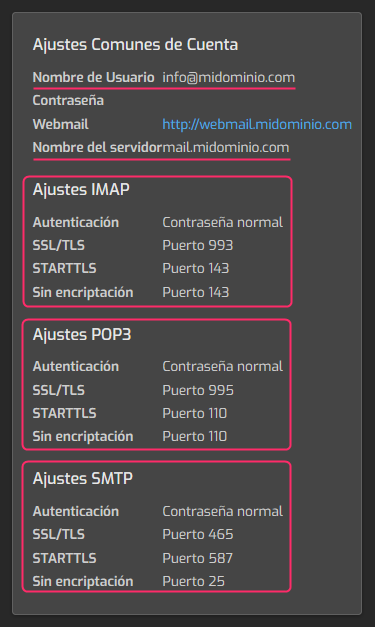
Below, we detail the accesses to Webmail and how to obtain the settings to configure the mailboxes in external mail clients such as Outlook, Thunderbird, Mac Mail, etc.
- Access from the browser
- Access from the Control Panel
- Settings to configure mailboxes in external mail clients
Access from the browser
In your browser type the web address:
webmail.tudominio.com
replacing tudominio.com with the domain of your mailboxes.
Access from the Control Panel
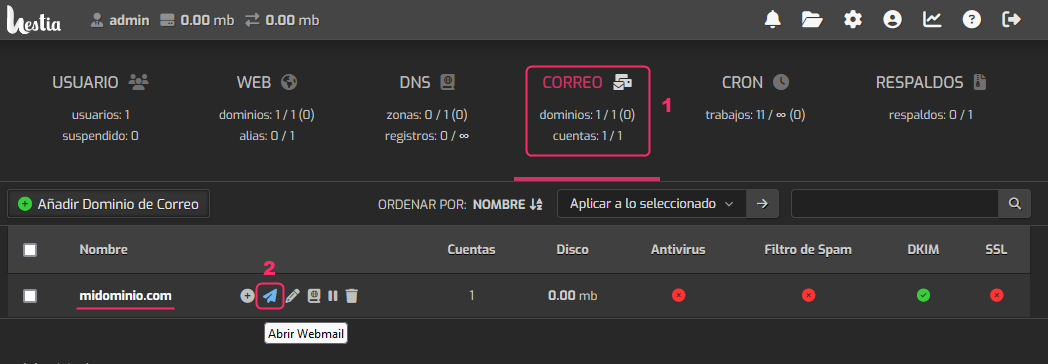
- Log in to the HestiaCP Control Panel
- In the control panel go to the MAIL area.
- In the domain list click the blue paper plane icon.
Settings to configure mailboxes in external mail clients
When creating a mailbox, or when modifying its settings, you will see on the right a box with the details to configure in the mail client you use.