

How to terminate an account?
This section describes the WHM option that allows you to delete domains within your Reseller plan.
After accessing the WHM of your Reseller plan, go to ‘Account Functions’ => ‘Terminate Accounts’.
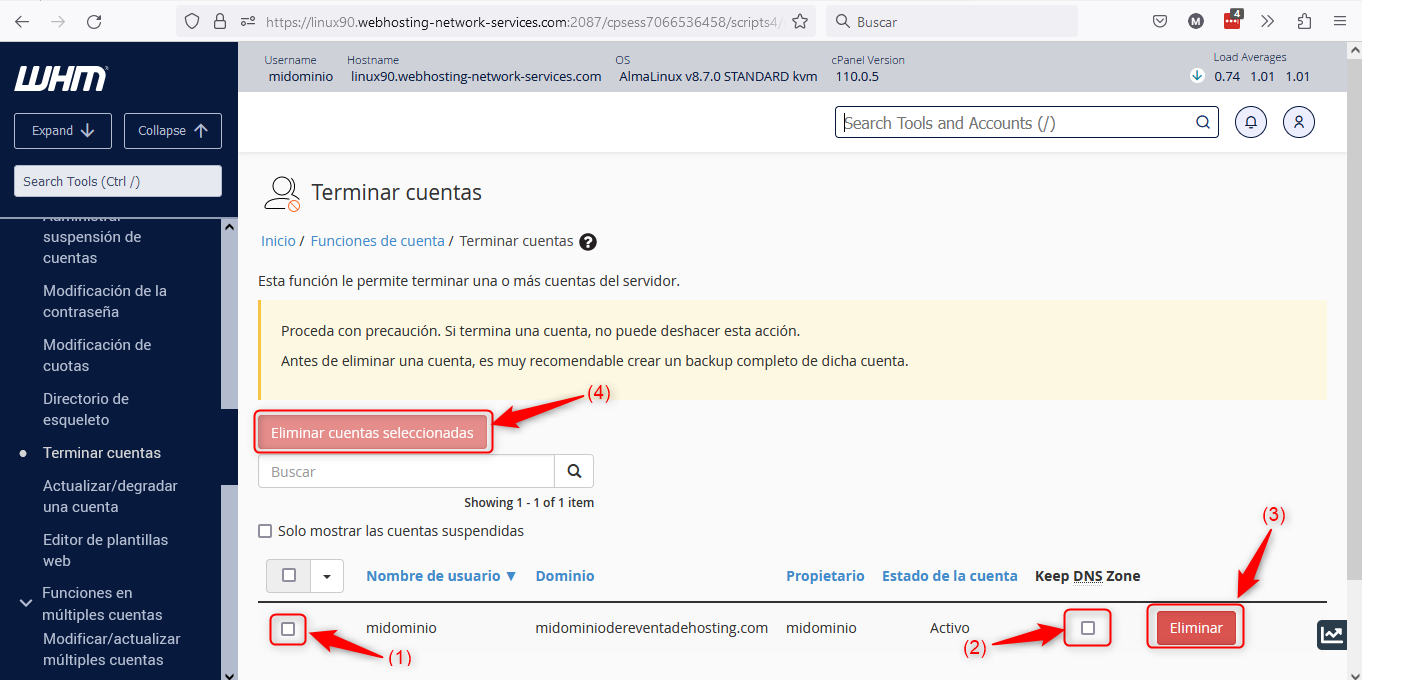
Below we detail the points marked in the image:
(1) => This is where you select the domains to delete. Once all selected, you can run the termination process with the button marked in (4).
(2) => Here you will choose whether to keep the site’s DNS zone on the server after deleting it. If you keep the DNS zone you will not be able to recreate the site in your WHM until the zone is removed (*). This applies whether creating the site with its own cPanel or creating it as an addon domain or ALIAS in another domain’s cPanel on your server.
(3) => This button is used only to delete a specific domain from your WHM.
(4) => This is used to delete multiple selected domains at the same time.
(*) => You can delete the DNS zone from ‘DNS Functions’ => ‘Delete a DNS Zone’.