

How to view my website without a domain?
- To be able to view your website without having a domain pointing to it, you must edit the hosts file located at:
C:/Windows/System32/drivers/etc - In that file add this line at the end:
IPdetuservidor tudominio.com.ar www.tudominio.com.ar
Example:
66.55.125.22 midominioejemplo.com www.midominioejemplo.com
- The IP number is the server where your hosting account is located.
- The domain you choose can be any for temporary use.
- Keep in mind that you must edit this file with Notepad by opening it with administrator permissions, as shown below:
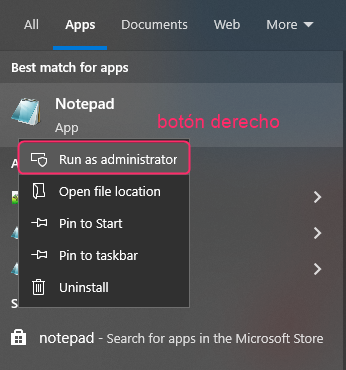
- Then restart your PC.
- That’s it. Now, you can test your website using your test domain. When your real domain is already pointing to your hosting account, you can delete the lines added to the hosts file.